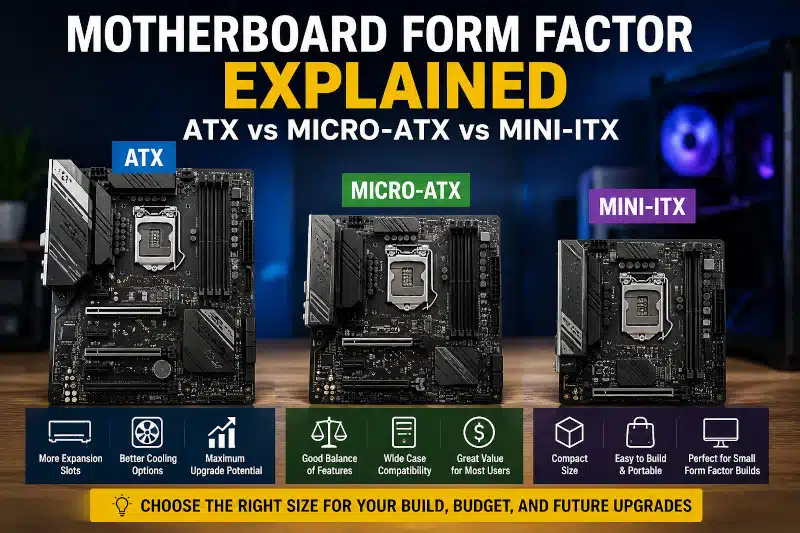
Choosing the right motherboard form factor is one of the most important decisions when building or upgrading a computer. The motherboard serves as the foundation of your system, connecting your processor, memory, storage devices, graphics card, and other hardware components.
Many computer users focus on processor speed or graphics card performance while overlooking motherboard size. However, selecting the wrong motherboard form factor can create compatibility problems, limit future upgrades, and affect overall system performance.
This guide explains the differences between ATX, Micro-ATX, and Mini-ITX motherboards and helps you determine which option best fits your needs.
What Is a Motherboard Form Factor?
A motherboard form factor refers to the physical dimensions, mounting-hole locations, power-connector placement, and overall layout of a motherboard. The form factor determines which computer cases can accommodate the motherboard and how much space is available for expansion cards, memory modules, storage devices, and cooling solutions.
Several motherboard form factors exist, but ATX, Micro-ATX, and Mini-ITX are the most common options for consumer desktop computers.
Why Motherboard Form Factor Matters
Motherboard size affects much more than whether the board fits inside a computer case. It also influences expansion capabilities, airflow, upgrade options, and overall system flexibility.
A larger motherboard typically provides:
- More PCIe expansion slots
- Additional M.2 storage connectors
- More RAM slots
- Better airflow around components
- Greater upgrade potential
On the other hand, smaller motherboards allow builders to create compact systems that take up less desk space. However, these smaller designs often require sacrifices in expansion and cooling options.
Before purchasing a motherboard, it is important to consider both your current hardware requirements and future upgrade plans.
ATX Motherboards
ATX is the standard motherboard form factor used in many gaming PCs, workstations, and high-performance desktop systems.
Advantages of ATX Motherboards
ATX motherboards offer:
- Multiple PCIe expansion slots
- Support for larger cooling systems
- More storage connectivity options
- Better component spacing
- Excellent upgrade flexibility
Because of their larger size, ATX boards provide more room for additional graphics cards, capture cards, sound cards, networking cards, and storage devices.
Best Uses for ATX
ATX motherboards work well for:
- Gaming PCs
- Content creation systems
- Video editing workstations
- Streaming computers
- Users who plan frequent upgrades
The larger footprint makes ATX an excellent choice for users who want maximum flexibility.
Micro-ATX Motherboards
Micro-ATX motherboards are smaller than standard ATX boards while retaining many of the same features.
Advantages of Micro-ATX
Micro-ATX offers:
- Lower cost
- Good expansion options
- Wide case compatibility
- Smaller overall system size
Most Micro-ATX motherboards still provide multiple memory slots and enough PCIe connectivity for a gaming graphics card and other expansion devices.
Best Uses for Micro-ATX
Micro-ATX is ideal for:
- General home computers
- Budget gaming systems
- Office workstations
- Users seeking a balance between size and expandability
For many users, Micro-ATX delivers the best combination of value and functionality.
Mini-ITX Motherboards
Mini-ITX motherboards are designed for small-form-factor computers with limited space.
Although Mini-ITX boards are physically smaller, they can still support powerful processors and graphics cards.
Advantages of Mini-ITX
Mini-ITX systems offer:
- Compact size
- Easy portability
- Minimal desk space requirements
- Clean, modern appearance
Limitations of Mini-ITX
Because of the smaller design, Mini-ITX motherboards often include:
- Fewer expansion slots
- Fewer RAM slots
- Limited storage expansion
- Reduced cooling flexibility
Despite these limitations, Mini-ITX remains popular among enthusiasts who want a compact gaming or home entertainment system.
ATX vs Micro-ATX vs Mini-ITX Comparison
| Feature | ATX | Micro-ATX | Mini-ITX |
| Physical Size | Largest | Medium | Smallest |
| PCIe Slots | Most | Moderate | Limited |
| RAM Slots | Usually 4 or more | Usually 4 | Usually 2 |
| Cooling Options | Excellent | Good | Limited |
| Storage Expansion | Excellent | Good | Limited |
| Upgrade Potential | Excellent | Good | Limited |
| Cost | Higher | Moderate | Often Higher |
| Best For | Gaming and Workstations | General Use and Gaming | Compact Builds |
Best Motherboard Form Factor for Gaming
The best motherboard form factor for gaming depends on your goals, budget, and available space.
ATX for High-End Gaming
ATX motherboards are often preferred for gaming builds because they offer:
- Additional expansion slots
- Better airflow
- More storage options
- Enhanced upgrade potential
Gamers who plan to stream, edit videos, or install multiple expansion cards often benefit from an ATX motherboard.
Micro-ATX for Most Gamers
Micro-ATX motherboards can support modern gaming hardware while reducing overall system cost.
For many gamers, a Micro-ATX board provides all the features necessary to build a powerful gaming PC without paying for expansion capabilities they may never use.
Mini-ITX for Compact Gaming Systems
Mini-ITX is an excellent option for gamers who want a powerful system in a small footprint.
Although expansion options are more limited, many Mini-ITX gaming systems deliver outstanding performance when paired with the right components.
Common Mistakes When Choosing a Motherboard Form Factor
Selecting the wrong motherboard can create problems during a build or upgrade.
Common mistakes include:
Buying a Motherboard That Does Not Fit the Case
Always verify that your case supports the motherboard form factor you intend to use.
Ignoring Future Upgrades
Some users focus only on current needs and later discover they lack expansion slots, storage connectors, or memory capacity.
Forgetting CPU Compatibility
The motherboard form factor does not determine processor compatibility. Always confirm that the motherboard supports your chosen CPU socket and chipset.
Overlooking Cooling Requirements
Smaller systems can be more difficult to cool effectively. High-performance components may require additional airflow considerations.
Choosing the Right Motherboard for Future Upgrades
Future-proofing your system can save money and extend your computer’s lifespan.
When selecting a motherboard, consider:
- Available PCIe slots
- Maximum memory capacity
- Number of M.2 storage connectors
- SATA port availability
- CPU upgrade options
- Cooling support
A motherboard that offers expansion slots can help avoid expensive replacements later.
What I See During PC Builds and Upgrades
When helping customers build or upgrade computers, one of the most common issues I encounter is selecting an inappropriate motherboard. Many users purchase a motherboard solely based on price without considering future expansion needs.
For example, a budget motherboard may work perfectly today. However, adding more storage, increasing memory capacity, or installing additional expansion cards later can become difficult or impossible.
I often recommend selecting a motherboard that provides some room for future upgrades. Spending a little more up front can prevent unnecessary hardware replacement costs down the road.
Gaming PC Upgrade and Build Assistance in Davenport, FL
Choosing the right motherboard can be confusing, especially when planning a gaming PC build or major hardware upgrade.
At PCMechanic Computer Repair, I help customers in Davenport, Florida, select compatible components for custom computer builds, gaming system upgrades, motherboard replacements, BIOS updates, cooling improvements, and hardware installations.
Whether you are building your first gaming PC or upgrading an existing system, I can help ensure your motherboard, processor, memory, storage devices, and case all work together properly.
Frequently Asked Questions
What is the most common motherboard form factor?
ATX remains the most common motherboard form factor because it provides excellent expansion capabilities and broad compatibility.
Is Micro-ATX good for gaming?
Yes. Most gamers can build a powerful gaming system using a Micro-ATX motherboard. Many Micro-ATX boards support modern processors, high-end graphics cards, and fast storage devices.
Can a Micro-ATX motherboard fit in an ATX case?
Yes. Most ATX computer cases support ATX, Micro-ATX, and Mini-ITX motherboards.
Is Mini-ITX less powerful than ATX?
Not necessarily. Performance depends on the installed components. However, Mini-ITX systems generally provide fewer expansion opportunities.
How do I know which motherboard form factor my case supports?
Check the case specifications provided by the manufacturer. The supported motherboard sizes are typically listed in the product documentation. You can also learn more about computer case sizes in our guide to Gaming PC Case Size and Compatibility.
