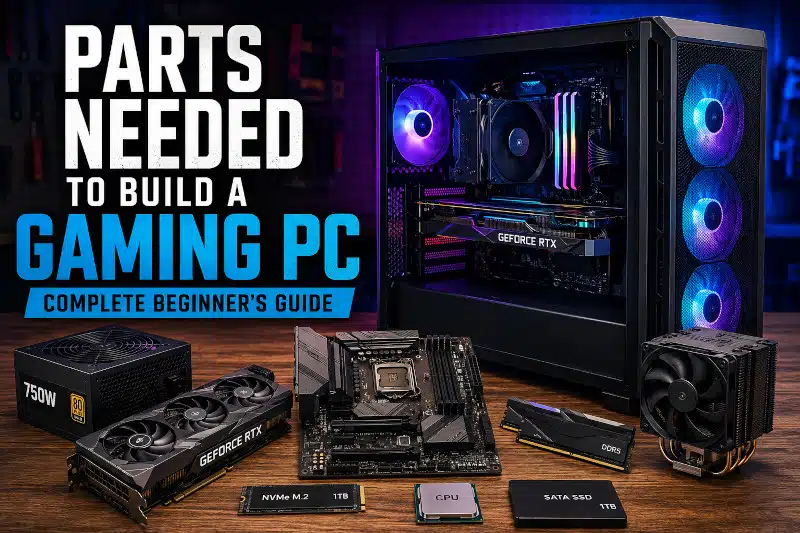
Understanding the parts needed to build a gaming PC is essential before purchasing components. Building a gaming PC is one of the best ways to get the performance you want while maintaining control over your budget. Additionally, building your own computer allows you to choose quality components, customize future upgrades, and avoid unnecessary software often found on prebuilt systems.
However, selecting compatible hardware can feel overwhelming if you are new to PC building. Therefore, understanding the purpose of each component is essential before purchasing parts.
In this guide, I explain the parts needed to build a gaming PC and provide helpful tips to ensure your components work together properly.
Parts Needed to Build a Gaming PC Checklist
The following checklist covers the parts needed to build a gaming PC from start to finish. Before starting your build, make sure you have the following components:
- Central Processing Unit (CPU)
- Motherboard
- Memory (RAM)
- Graphics Card (GPU)
- NVMe SSD Storage
- Power Supply Unit (PSU)
- PC Case
- CPU Cooler
- Case Fans
- Operating System
- Monitor
- Keyboard
- Mouse
- Internet Connectivity (Ethernet or Wi-Fi)
- Audio Equipment (Headset or Speakers)
Now, let’s examine each component in detail.
Central Processing Unit (CPU)
The CPU serves as the brain of your gaming computer. It processes instructions, performs calculations, and coordinates communication between hardware components.
When selecting a CPU, consider:
- Core count
- Clock speed
- Gaming performance
- Upgrade path
- Power consumption
Popular gaming CPUs come from AMD and Intel. While both manufacturers offer excellent options, the best choice depends on your budget and performance goals.
Additionally, the CPU you choose determines which motherboard socket you need. Therefore, compatibility should always be verified before purchasing.
Motherboard
The motherboard connects all of your computer’s components and enables communication between them.
When choosing a motherboard, consider:
- CPU socket compatibility
- RAM support
- Storage options
- Expansion slots
- Built-in networking features
Furthermore, motherboard size plays an important role in your build. Before purchasing, learn about motherboard sizes in my guide to Motherboard Form Factor Explained: ATX vs Micro-ATX vs Mini-ITX.
Selecting the correct motherboard ensures your build remains flexible and upgrade-friendly for years to come.
Memory (RAM)
RAM temporarily stores data that your CPU actively uses. As a result, sufficient memory improves system responsiveness and multitasking performance.
For most gaming systems:
- 16GB is the recommended minimum.
- 32GB is ideal for gaming and content creation.
- Faster memory can improve performance in some games.
Although some budget systems still use 8GB, modern games increasingly benefit from larger memory capacities.
Graphics Card (GPU)
The graphics card is often the most important component in a gaming PC. It renders images, videos, and game environments.
When selecting a GPU, consider:
- Resolution goals
- Refresh rate
- VR compatibility
- Ray tracing support
- Power requirements
A powerful graphics card significantly improves gaming performance. However, not every gamer needs a flagship model.
If your existing system needs more performance, you may find it more affordable to upgrade rather than replace your computer. Learn more in my article about Affordable Gaming PC Upgrades in Davenport, FL.
Storage Drives
Storage devices hold your operating system, games, and personal files.
NVMe SSD
An NVMe SSD should be the primary drive in most modern gaming PCs because it offers exceptional speed and responsiveness.
Benefits include:
- Faster boot times
- Faster game loading
- Improved system responsiveness
- Reduced waiting times
For most gamers, a 1TB NVMe SSD is the recommended starting point.
To learn more, read my guide on M.2 NVMe SSD for Gaming.
Secondary Storage
Some users add larger SSDs or hard drives for:
- Media storage
- Game libraries
- Backups
- Archived files
Although traditional hard drives remain useful for bulk storage, SSDs provide much better performance.
Power Supply Unit (PSU)
The power supply distributes electricity to every component in your gaming PC.
Choosing a quality PSU is critical because it affects system stability and reliability.
When shopping for a power supply, consider:
- Wattage requirements
- Efficiency rating
- Cable quality
- Manufacturer reputation
Generally, purchasing a slightly larger PSU than your current requirements allows room for future upgrades.
PC Case
The PC case houses and protects your components while supporting airflow and cooling.
A good gaming case should provide:
- Excellent airflow
- Cable management features
- GPU clearance
- Cooling support
- Easy access for upgrades
Additionally, a quality case can improve cooling performance and simplify maintenance.
CPU Cooling
Every gaming PC requires adequate CPU cooling to maintain safe operating temperatures.
Common cooling options include:
- Air coolers
- All-in-one liquid coolers
Air coolers offer excellent reliability and value. On the other hand, liquid coolers often provide improved aesthetics and cooling performance.
If you are considering a cooling upgrade, read about my CPU Cooler Upgrade Service.
Additionally, you can learn more about cooling options in the “All-in-One Liquid CPU Cooler Pros and Cons.”
Case Fans
Case fans help move cool air into your system and remove hot air.
Proper airflow helps:
- Reduce component temperatures
- Improve system stability
- Extend component lifespan
Therefore, fan placement should always be considered when planning a build.
Operating System
An operating system allows your hardware and software to work together.
Most gaming PCs use Windows 11 because:
- It supports the latest games.
- It offers broad hardware compatibility.
- It receives ongoing updates and security improvements.
Consequently, Windows remains the preferred platform for most gamers.
Wireless Networking
Internet connectivity is essential for modern gaming.
Your options include:
Ethernet
Ethernet connections typically provide:
- Lower latency
- Greater reliability
- Faster speeds
Wi-Fi
Wi-Fi offers:
- Convenience
- Flexible placement
- Reduced cable clutter
Many modern motherboards now include built-in Wi-Fi capabilities.
Gaming Audio Equipment
Although audio equipment is often overlooked, it remains an important part of the gaming experience.
You may want:
- Gaming headset
- Desktop speakers
- Dedicated microphone
Quality audio can improve communication, immersion, and overall enjoyment.
Gaming Peripherals
To use your gaming PC effectively, you will also need peripherals.
Monitor
Your monitor determines how your games appear visually.
Popular gaming monitor options include:
- 1080p
- 1440p
- 4K
Higher refresh rates can also improve gameplay smoothness.
Keyboard
Gaming keyboards offer:
- Improved durability
- Faster response times
- Customizable features
Mouse
A quality gaming mouse provides:
- Better accuracy
- Adjustable sensitivity
- Additional programmable buttons
How to Ensure the Parts Needed to Build a Gaming PC Are Compatible
One of the most common mistakes beginners make is purchasing incompatible hardware.
Before ordering parts, verify:
- CPU and motherboard socket compatibility
- RAM support
- GPU clearance within the case
- Power supply wattage
- Storage connections
- Cooler mounting compatibility
Additionally, checking compatibility before purchasing can prevent costly mistakes and unnecessary delays.
Need Help Choosing the Parts Needed to Build a Gaming PC?
Choosing compatible gaming PC components can be challenging, especially for first-time builders. Fortunately, I provide Gaming PC Build Services in Davenport, FL.
I can help with:
- Part selection
- Hardware assembly
- BIOS configuration
- Windows installation
- System testing
- Performance verification
Whether you already have components or need guidance selecting parts, I can help ensure your gaming PC is built correctly.
Gaming PC Build Services for the Parts Needed to Build a Gaming PC
I provide gaming PC build assistance for customers in:
- Davenport
- ChampionsGate
- Haines City
- Loughman
- Kissimmee
- Celebration
- Clermont
If you need help selecting compatible hardware or assembling your system, visit my Gaming PC Build Services page to learn more.
Common Mistakes When Choosing the Parts Needed to Build a Gaming PC
Many first-time builders accidentally choose incompatible hardware, underestimate power requirements, or purchase a case that cannot accommodate their graphics card. Therefore, researching the parts needed to build a gaming PC before buying components can help avoid costly mistakes.
Conclusion
Understanding the parts needed to build a gaming PC helps you make informed purchasing decisions and avoid compatibility issues. Furthermore, selecting quality components can improve performance, reliability, and future upgrade potential.
Whether you are building your first gaming PC or upgrading an existing system, choosing the right hardware is the foundation of a successful build.
If you would like professional assistance, contact PCMechanic Computer Repair in Davenport, FL, today.

Frequently Asked Questions
What parts do I need to build a gaming PC?
The parts needed to build a gaming PC include a CPU, motherboard, RAM, graphics card, storage drive, power supply, case, CPU cooler, operating system, monitor, keyboard, and mouse.
Is 16GB RAM enough for gaming?
Yes. Most modern games run well with 16GB of RAM. However, many new gaming PCs now include 32GB of DDR5 memory because it offers more headroom for demanding games, streaming, and multitasking.
Do I need a graphics card for a gaming PC?
Yes. A dedicated graphics card is recommended for gaming because it significantly improves gaming performance and visual quality.
What size power supply do I need for a gaming PC?
The required wattage depends on your components. Most gaming PCs use power supplies ranging from 650W to 850W. However, enthusiasts using flagship graphics cards and high-end processors may benefit from a 1000W or larger power supply to ensure stable performance and allow room for future upgrades.
Can I build a gaming PC myself?
Yes. Many gamers successfully build their own computers. However, compatibility planning and careful assembly are important.
How much does it cost to build a gaming PC?
Gaming PC costs vary widely depending on component selection and current hardware prices. Budget-friendly gaming PCs often start around $800, while high-performance gaming systems can exceed $2,000.