
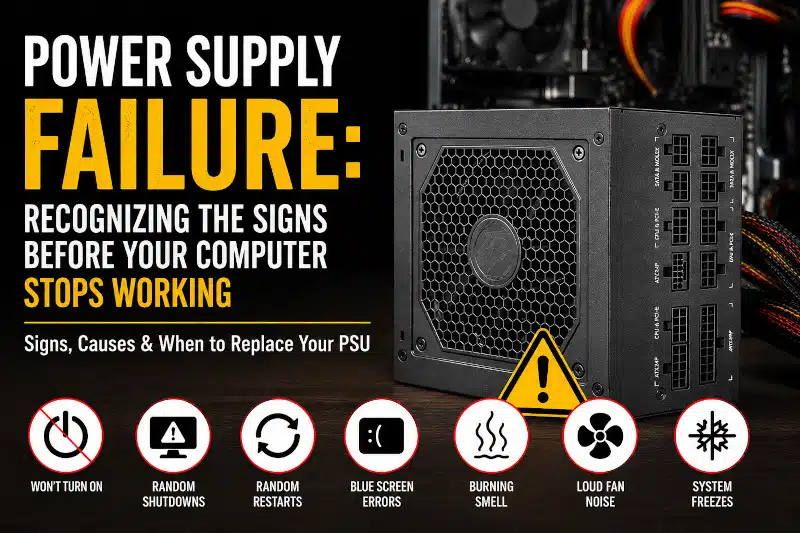
Power Supply Failure at a Glance
A power supply failure can cause random shutdowns, failed startups, system crashes, or permanent hardware damage. Fortunately, recognizing the early warning signs allows you to replace a failing power supply before it affects other computer components. Understanding these symptoms helps protect your computer and avoid unexpected downtime.
What Is a Power Supply Failure?
The power supply unit (PSU) converts electricity from your wall outlet into the voltages your computer requires. Every component, including the motherboard, processor, graphics card, storage drives, and cooling fans, depends on a stable power supply to operate correctly.
When the PSU begins to fail, it may no longer deliver clean and consistent power. As a result, your computer can become unstable. Initially, the symptoms may appear minor. However, they often become more frequent as the power supply continues to deteriorate.
Unlike many hardware components, a failing PSU rarely repairs itself. Instead, the problem usually worsens over time. Consequently, replacing a defective unit early is often the safest solution.
Why Power Supplies Fail
Power supplies have a limited lifespan. Although many quality units last several years, continuous operation gradually wears down internal components.
Several factors contribute to power supply failure.
Aging Components
Electrolytic capacitors naturally degrade with age. Eventually, they lose their ability to regulate voltage correctly. Therefore, an older PSU may begin producing unstable power even if it previously worked without issues.
Heat Buildup
Heat is one of the biggest enemies of electronic components. If dust blocks airflow or cooling fans become inefficient, internal temperatures increase. Consequently, excessive heat shortens the power supply’s lifespan.
Regularly cleaning dust from your computer can improve airflow. Likewise, upgrading your computer’s airflow with a better case can reduce internal temperatures. Learn more in our Benefits of Upgrading Your PC Case article.
Electrical Surges
Power spikes caused by storms or unstable electrical service can damage sensitive PSU circuitry. Although surge protectors reduce this risk, they cannot eliminate every electrical hazard.
Low-Quality Power Supplies
Not all power supplies are built to the same standard. Budget units often use lower-quality capacitors and voltage regulators. As a result, they may fail much sooner than higher-quality models.
Overloading the PSU
Installing a powerful graphics card or additional hardware increases electrical demand. If your existing power supply cannot provide enough wattage, it may become overloaded. Consequently, system instability often follows.
If you’re planning hardware upgrades, our PC Gaming Upgrades guide explains how to select compatible components.
Common Signs of a Failing Power Supply
Recognizing the warning signs early can prevent more expensive repairs later.
Random Shutdowns
One of the most common symptoms is unexpected shutdowns. Your computer may power off while gaming, editing videos, or performing other demanding tasks.
Because these shutdowns occur without warning, many people mistakenly suspect Windows or overheating. However, an unstable PSU is often the real cause.
Computer Won’t Turn On
Sometimes the computer shows no signs of life.
You may notice:
- No power lights
- No fan movement
- No display
- No startup sounds
Although several components can cause this problem, the power supply is one of the first items to test.
Random Restarts
If your computer repeatedly restarts without displaying error messages, unstable voltage may be responsible.
Since the motherboard depends on consistent power, even brief voltage drops can trigger an automatic restart.
Blue Screen Errors
While Blue Screen of Death (BSOD) errors frequently result from software or memory issues, unstable power can also produce unpredictable crashes.
Therefore, recurring BSODs combined with other power symptoms should never be ignored.
Burning Smell
A burning odor is one of the most serious warning signs.
Immediately turn off the computer and disconnect it from the power source.
A damaged capacitor or an overheating internal component may be failing. Continuing to operate the system could increase the risk of additional hardware damage.
Loud Fan Noise
Power supply fans naturally become louder under heavy loads. However, grinding, rattling, or unusually loud fan noise may indicate worn bearings or excessive internal heat.
System Freezes
If your computer freezes randomly without any obvious software problem, inconsistent voltage may be interrupting communication between hardware components.
Although many issues can cause freezing, a failing PSU should remain on the troubleshooting checklist.
Graphics Problems During Gaming
Gamers sometimes notice:
- Screen flickering
- Black screens
- GPU crashes
- Sudden game exits
- Driver timeout errors
Because modern graphics cards consume significant power, voltage can drop during demanding workloads.
If your gaming computer experiences these issues, our Gaming PC Troubleshooting guide explains other possible causes.
How to Diagnose a Power Supply Problem
Power supply failures can resemble problems with the motherboard, memory, or graphics card. Therefore, proper testing is essential before replacing parts.
Perform a Visual Inspection
Begin by looking for obvious warning signs.
Check for:
- Burn marks
- Damaged cables
- Excessive dust
- Fan obstruction
- Loose connectors
If anything appears damaged, discontinue use until the system has been inspected.
Listen for Unusual Sounds
A clicking or grinding noise coming from the power supply often indicates internal mechanical wear.
Although fan replacement may solve some cooling problems, internal electrical failures generally require replacing the entire unit.
Monitor System Behavior
Notice when the problem occurs.
For example:
- Only while gaming
- During startup
- Under heavy workloads
- Completely at random
Patterns often help narrow the source of the issue.
Test with a Known Good PSU
One of the most reliable diagnostic methods is to temporarily install a known-good power supply.
If the computer becomes stable afterward, the original PSU has likely failed.
Because improper installation can damage hardware, many homeowners prefer professional testing.
At PCMechanic Computer Repair, I perform systematic hardware diagnostics to determine whether the power supply is truly at fault before recommending replacement. This approach helps avoid unnecessary component replacements and ensures that the root cause of the problem is identified.
Why You Shouldn’t Ignore PSU Problems
Many people continue using their computers after the first signs of a failing power supply appear. Unfortunately, this can lead to more than unexpected shutdowns. As the PSU deteriorates, it may deliver unstable voltage that stresses other components.
For example, the motherboard, graphics card, storage drives, and memory all rely on clean, consistent power. If the voltage fluctuates outside normal ranges, these components may become unstable or, in severe cases, sustain permanent damage.
In addition, repeated hard shutdowns increase the risk of file corruption and operating system problems. If Windows is writing data to the drive when power is suddenly lost, important files can become damaged. Over time, this may lead to boot failures or an unbootable operating system.
Addressing a failing PSU early is often far less expensive than replacing multiple damaged components later.
Preventing Power Supply Failure
Although every power supply eventually reaches the end of its lifespan, several preventive measures can help extend its reliability.
Keep Your Computer Clean
Dust is one of the leading causes of excessive heat inside a computer. As dust accumulates, it restricts airflow and forces cooling fans to work harder.
Regularly cleaning the interior helps maintain lower temperatures and reduces stress on the power supply.
Use a Quality Surge Protector
Electrical surges can occur without warning. Therefore, connecting your computer to a quality surge protector provides an additional layer of protection against unexpected voltage spikes.
While surge protectors cannot prevent every electrical issue, they significantly reduce the risk of damage from common power fluctuations.
Choose the Right Wattage
Installing high-performance hardware without upgrading the power supply can overload the system.
If you plan to install a new graphics card, additional storage drives, or a faster processor, verify that your PSU provides enough continuous wattage to support the new components.
If you’re unsure which parts are compatible, our guide, “What Components Make Up a Gaming PC?” explains how each component works together.
Improve Airflow
Proper airflow helps every component run cooler, including the power supply.
Adding intake and exhaust fans, organizing cables, and choosing a well-ventilated computer case can improve cooling throughout the system.
You can also learn more in our article, “Benefits of Upgrading Your PC Case.”
Buy a Quality Power Supply
A high-quality PSU is one of the best long-term investments for any computer.
Look for features such as:
- 80 PLUS efficiency certification
- High-quality capacitors
- Over-voltage protection
- Short-circuit protection
- Over-current protection
- Over-temperature protection
Although premium power supplies typically cost more initially, they often offer greater reliability and a longer service life.
When It’s Time to Replace Your Power Supply
Not every computer problem requires a new PSU. However, replacement is usually the best option when testing confirms the power supply is failing.
You should consider replacing your power supply if:
- The computer randomly shuts down.
- The system frequently restarts.
- The computer no longer powers on.
- The PSU emits a burning smell.
- The cooling fan has failed.
- Voltage testing indicates unstable output.
- The power supply is several years old and showing multiple symptoms.
Attempting to repair a defective power supply is generally not recommended. Internal capacitors can retain dangerous electrical charges even after the unit has been unplugged. For that reason, replacing the entire PSU is typically the safest and most reliable solution.
If your computer requires additional hardware upgrades at the same time, our Gaming PC Build Services in Davenport, FL page explains how properly matched components improve long-term stability and performance.
Professional Power Supply Replacement in Davenport, FL
Determining whether a power supply has failed requires more than simply replacing parts. Many symptoms that resemble PSU failure can also result from a faulty motherboard, failing memory, overheating, or storage issues.
At PCMechanic Computer Repair, I perform systematic diagnostics to identify the actual cause of the problem before recommending replacement. This approach helps prevent unnecessary expenses and ensures the correct component is repaired.
As the owner and technician, I personally inspect every computer that comes into my shop. Whether your desktop experiences random shutdowns, refuses to power on, or becomes unstable under heavy workloads, I’ll determine whether the power supply is the cause and recommend the most practical solution.
If you’re experiencing power-related issues, visit my Computer Repair Service in Davenport, FL page to learn more or schedule service.
Experiencing random shutdowns, startup failures, or other power supply issues? Schedule a professional diagnosis with PCMechanic Computer Repair to identify the problem before it causes additional hardware damage.

Frequently Asked Questions
What are the first signs of power supply failure?
Common early symptoms include random shutdowns, unexpected restarts, system freezes, blue screen errors, and difficulty powering on the computer.
Can a failing power supply damage other computer components?
Yes. A failing PSU can deliver unstable voltage, potentially affecting the motherboard, graphics card, storage drives, and other hardware if the problem is ignored.
How long does a computer power supply last?
Most quality power supplies last between five and ten years. However, lifespan depends on build quality, operating temperatures, electrical conditions, and overall system usage.
Can a bad power supply cause a computer to freeze?
Yes. Inconsistent voltage can interrupt communication between hardware components, resulting in random freezes, crashes, or restarts.
Why does my computer randomly shut down while gaming?
Gaming places heavy demands on the graphics card and processor. If the power supply cannot provide stable power under load, the computer may suddenly shut down or restart.
Should I repair or replace a failing power supply?
In most cases, replacement is the safest option. Because power supplies contain high-voltage components, internal repairs are generally not recommended.
Can dust cause a power supply to fail?
Yes. Excessive dust restricts airflow, raises operating temperatures, and accelerates wear on internal components, including cooling fans and capacitors.
How do I know if my motherboard or power supply is the problem?
Many symptoms overlap. Professional diagnostic testing is often the fastest and most reliable way to determine which component has failed before purchasing replacement parts.
Conclusion
A power supply is one of the most important components inside any computer. Although its job often goes unnoticed, every other piece of hardware depends on it to receive clean, stable power.
Fortunately, many power supply failures provide warning signs before complete failure occurs. Random shutdowns, startup problems, burning odors, freezing, and system instability should never be ignored. Recognizing these symptoms early can help prevent additional hardware damage and reduce repair costs.
If your computer shows signs of a power supply failure, professional diagnostics can identify the root cause and determine whether a replacement is necessary. To learn more about the replacement process and why a quality PSU matters, read our article, “Power Supply Replacement Service: A Crucial Step for a Healthy PC.”
Need Help Diagnosing a Power Supply Problem?
If your desktop computer won’t turn on, shuts down randomly, or becomes unstable, PCMechanic Computer Repair provides professional diagnostics and power supply replacement services for customers in Davenport, ChampionsGate, Haines City, Celebration, Kissimmee, Four Corners, and nearby communities.
Don’t wait for a complete power supply failure. Contact PCMechanic Computer Repair today for expert PSU diagnostics and replacement services in Davenport, FL, and restore your computer’s reliability.